RO-CAM PC Controls: Keybinds, Ammo Check & Reloads
Documented PC menu keys (T, Q/E, H), manual magazine inspection, two-handed reloads, night flashlight rules, and honest platform verification status for RO-CAM.
Documented PC Keybinds & Verification Status
RO-CAM's lobby interface runs inside an in-game tactical tablet. Below are the PC controls documented from November 2026 Beta footage alongside actions whose default keys are not yet verified by this site (we do not guess common FPS bindings):
| Key / Input | Action | Verification Status |
|---|---|---|
T |
Open / Close Tablet & Armoury | Documented in Beta footage (Play, Armoury, Progress, Settings, Feedback, Controls). |
Q / E |
Switch Armoury Tabs | Documented in Beta footage (cycles Guns, Kits, Patches, Headwear, Masks, Vests, Gear, Gun Camos, MVP Music, Store). |
H |
Sit Out (Intermission) | Documented prompt on the lobby intermission screen. |
W A S D |
Operator Movement | Standard Roblox PC movement. |
| Mouse (LMB / RMB) | Fire / Aim Down Sights | Free-aim and ADS with no center-screen crosshair. |
| Magazine Check | Pull mag to inspect remaining rounds | Not yet verified — check T -> Controls in-game for the current Beta key. |
| Reload / Flashlight | Two-handed reload / Night flashlight toggle | Not yet verified — check T -> Controls in-game for the current Beta keys. |
Core Realism Mechanics Every New Player Must Learn
1. Zero Crosshair & Helmet-Cam Shake
RO-CAM removes the floating center reticle completely and adds deliberate helmet-cam sway. Warm up on the firing range (tied to the Marksman and Steady Hand badges) to learn where your Hi-Point or upgraded pistol hits before queuing into 6v6 Elimination.
2. Manual Magazine Checks (No Ammo HUD)
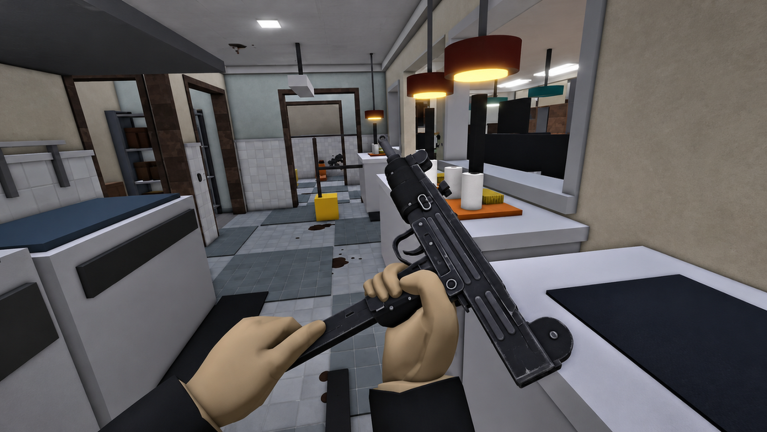
RO-CAM has no numeric bullet counter on screen. To check remaining rounds, your operator physically pulls the magazine to look at it. Check your mag behind cover before pushing a new room.
3. Two-Handed Reloads
Reloading uses both hands and briefly locks you out of firing. In Elimination (one life per round), reloading in the open puts you on teammate helmet-cam spectate for the rest of the round.
4. Night Maps & Flashlight Discipline
When a lobby votes for a Night map (including the snowy ghost town in Zombies Mode), flashlights help clear dark interiors, but opposing players can see your flashlight beam. In PvP night matches, keep your light off while holding an angle and flick it on briefly when clearing rooms.
PC Controls & Other Platform Status
This guide documents PC controls. Mobile, Xbox, and PlayStation compatibility has not been verified by this site.
If you play on a touchscreen or controller, do not rely on PC keyboard prompts like T or Q/E — check the in-game menu and Controls screen on your device after joining.
Sources & Verification
- PC Menu Keys (
T,Q/E,H): Documented from recorded November 2026 Beta gameplay footage. - Core Realism Mechanics: Verified directly against the official RO-CAM Roblox description (
Place 72746154142907, read Nov 28, 2026).
Related RO-CAM Guides
- Looking for reported milestone codes? Visit the RO-CAM Codes page.
- Planning your first gun upgrade? See Starter Weapons & Marks Prices.
- Hunting range or combat achievements? Browse the All 50 Badges Database.
Frequently Asked Questions
How do you check your ammo in RO-CAM?
RO-CAM has no HUD bullet counter; your operator physically pulls the magazine to inspect remaining rounds. The exact Beta keybind has not yet been verified by this site — check T -> Controls on PC for the current binding.
How do you open the Armoury and Codes menu on PC?
On PC, press the T key to open your operator tablet, where you can access Play, Armoury, Progress (Codes), Settings, Feedback, and Controls.
Why is there no crosshair in RO-CAM?
RO-CAM is designed as a realistic helmet-cam tactical shooter without a center reticle. Players aim using iron sights, ADS, and barrel alignment.
Does RO-CAM work on mobile, Xbox, or PlayStation?
This guide documents PC controls only. Mobile, Xbox, and PlayStation compatibility has not been verified by this site.